- Author: Scott Reilly
- Version: 1.3
- First released: 2009-06-12
- Last update: 2015-08-08
- Compatibility: WP 2.6 – 4.2.37
- Download: [ zip ]
- Description:
Display the pending comments count next to the approved comments count in the admin listing of posts.
-
Extended Description
NOTE: This plugin is deprecated as of WordPress 4.3, which now includes a display of the count of pending comments alongside the regular count of comments. And it does so in a more aesthetically pleasing fashion than this plugin ever did, so if you are using WP 4.3 or later, there’s no need to use this plugin. In fact, it won’t do anything for you if you try to use it. The plugin is still fully functional for WP 4.2 and earlier.
By default, in the admin listing of posts, each post has its count of approved comments displayed within a word bubble. If you hover over a comment count, the tooltip hover text indicates the number of pending comments. This plugin utilizes JavaScript to change the post listings so that the pending comments count is displayed next to the approved comments count inside the same word bubble (though with a separator).
The pending comments count will appear next to post comment counts in:
- The “Posts” listing of posts (formerly called “Edit Posts”)
- The “Pages” listing of pages (formerly called “Edit Pages”)
- The “Comments” listing of comments (formerly called “Edit Comments”)
This plugin will only function for users in the admin who have JavaScript enabled.
Links: Plugin Homepage | Plugin Directory Page | Author Homepage
Filters
The plugin is further customizable via two filters. Typically, these customizations would be put into your active theme’s functions.php file, or used by another plugin.
c2c_show_pending_comments_count_column_width
The ‘c2c_show_pending_comments_count_column_width’ filter allows you to customize the column width used for the comment column when pending comments are also being displayed. The WP default is “4em”, which is not sufficient to display a possible 3 digits for approved comments in addition to a possible 2 digits in pending comments. The default defined by the plugin is “5em” which should handle most cases sufficiently. Use the filter if you want to change the width.
Arguments:
- $comment_column_width (string): The width of the comment column. Default is “5em”. Express as a width measurement recognized by CSS.
Example:
<?php
// Make it even wider
function my_c2c_show_pending_comments_count_column_width( $comment_column_width ) {
    return '6em';
}
add_filter( 'c2c_show_pending_comments_count_column_width', 'my_c2c_show_pending_comments_count_column_width' );
?>
c2c_show_pending_comments_count_separator
The ‘c2c_show_pending_comments_count_separator’ filter allows you to specify the character used as the separator between the count of approved comments and the count of pending comments. By default this is ‘ • ‘ (a bullet, with space on either side).
Arguments:
-
$separator (string): The character or string to be used as the separator. By default this is ‘ • ‘ (note space of either side).
Find out more at the plugin’s WordPress Plugin Repository page.
-
Screenshots
Click to see full-size image.
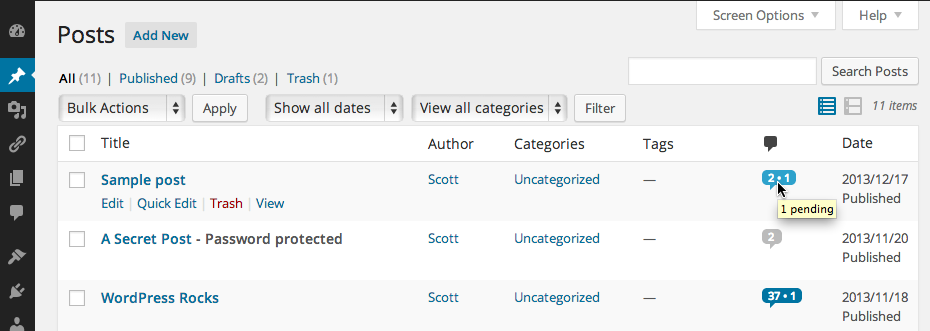
A screenshot of the ‘Posts’ admin page with the plugin active. The topmost post clearly indicates 2 approved comments and 1 comment pending. The second post has 2 approved comments with none pending. The third post has 37 approved comments and 1 comment pending.
-
Installation
- Unzip
show-pending-comments-count.zipinside the/wp-content/plugins/directory for your site (or install via the built-in WordPress plugin installer) - Activate the plugin through the ‘Plugins’ admin menu in WordPress
- Unzip
-
Release Log
1.3 (2015-08-07)
- Announce:: Deprecate plugin as of WP 4.3, which now shows a pending comment count in a more aesthetic fashion
- Add: Prevent the plugin from doing anything if activated for WP 4.3 or later
- Change: Modify JS to be tolerant of comment links lacking expected ‘title’ attribute (i.e. WP 4.3; though it is prevented from running for WP 4.3+ anyhow)
- Update: Note compatibility through WP 4.2+
1.2.7 (2015-02-17)
- Explicitly declare functions as public and static
1.2.6 (2015-02-17)
- Reformat plugin header
- Note compatibility through WP 4.1+
- Change documentation links to wp.org to be https
- Minor documentation spacing changes throughout
- Update copyright date (2015)
- Add plugin icon
1.2.5 (2013-12-19)
- Note compatibility through WP 3.8+
- Update copyright date (2014)
- Minor documentation tweaks
- Change donate link
- Update banner image for WP 3.8 admin refresh
- Update screenshot for WP 3.8 admin refresh
1.2.4
- Add check to prevent execution of code if file is directly accessed
- Note compatibility through WP 3.5+
- Update copyright date (2013)
- Minor code reformatting (spacing)
- Move screenshot into repo’s assets directory
1.2.3
- Re-license as GPLv2 or later (from X11)
- Add ‘License’ and ‘License URI’ header tags to readme.txt and plugin file
- Add banner image for plugin page
- Remove ending PHP close tag
- Note compatibility through WP 3.4+
1.2.2
- Add version() to return plugin version
- Note compatibility through WP 3.3+
- Add link to plugin directory page to readme.txt
- Update copyright date (2012)
1.2.1
- Note compatibility through WP 3.2+
- Minor code formatting changes (spacing)
- Fix plugin homepage and author links in description in readme.txt
1.2
- Add filter ‘c2c_show_pending_comments_count_column_width’ to allow customization of the column width used for the comment column
- Add filter ‘c2c_show_pending_comments_count_separator’ to allow customization of the character used as the separator between comments and pending comments
- Switch from object instantiation to direct class invocation
- Explicitly declare all functions public static and class variables private static
- Add Filters section to readme.txt
- Note compatibility through WP 3.1+
- Update copyright date (2011)
1.1
- Don’t even define class if not in the admin
- Rename class from ‘ShowPendingCommentsCount’ to ‘c2c_ShowPendingCommentsCount’
- Output JS via ‘admin_print_footer_scripts’ hook rather than ‘admin_footer’
- Assign object instance to global variable, $c2c_show_pending_comments_count, to allow for external manipulation
- Instantiate object within primary if(!class_exists()) check (at end)
- Note compatibility with WP 3.0+
- Minor code reformatting (spacing)
- Remove documentation and instructions from top of plugin file (all of that and more are contained in readme.txt)
- Add Upgrade Notice section to readme.txt
- Remove trailing whitespace
1.0.1
- Add PHPDoc documentation
- Note compatibility with WP 2.9+
- Update copyright date
1.0
- Initial release
-
Copyright & Disclaimer
Copyright © 2009-2024 by Scott Reilly (aka coffee2code)This program is free software; you can redistribute it and/or
modify it under the terms of the GNU General Public License
as published by the Free Software Foundation; either version 2
of the License, or (at your option) any later version.This program is distributed in the hope that it will be useful,
but WITHOUT ANY WARRANTY; without even the implied warranty of
MERCHANTABILITY or FITNESS FOR A PARTICULAR PURPOSE. See the
GNU General Public License for more details.You should have received a copy of the GNU General Public License
along with this program; if not, write to the Free Software
Foundation, Inc., 51 Franklin Street, Fifth Floor, Boston, MA 02110-1301, USA. -
Discussion / Support
Have any questions, comments, or suggestions? Please provide them via the plugin’s WordPress.org support forum. I’ll do my best to reply in a timely fashion and help as best I can.
Unfortunately, I cannot provide guaranteed support, nor do I provide support via any other means.
Was this plugin useful useful to you? Consider giving it a rating. If you’re inclined to give it a poor rating, please first post to the support forum to give me a chance to address or explain the situation.
Categories