- Author: Scott Reilly
- Version: 3.0.4
- First released: 2009-06-23
- Last update: 2015-07-15
- Compatibility: WP 3.6 – 4.2.37
- Download: [ zip ]
- Description:
Allow multiple user accounts to be created, registered, and updated having the same email address.
-
Extended Description
Allow multiple user accounts to be created, registered, and updated having the same email address.
By default, WordPress only allows a specific email address to be used for a single user account. This plugin removes that restriction.
The plugin’s settings page (accessed via Users -> Multiple Accounts or via the Settings link next to the plugin on the Manage Plugins page) provides the ability to allow only certain email addresses the ability to have multiple accounts (such as if you only want admins to have that ability; by default all email addresses can be used more than once). You may also specify a limit to the number of accounts an email address can have (by default there is no limit).
The settings page also provides a table listing all user accounts that share email addresses (see screenshot).
Compatible with Multisite and BuddyPress as well.
Links: Plugin Homepage | Plugin Directory Page | Author Homepage
Template Tags
The plugin provides three optional template tags for use in your theme templates.
Functions
<?php c2c_count_multiple_accounts( $email ); ?>
Returns a count of the number of users associated with the given email.
<?php c2c_get_users_by_email( $email ); ?>
Returns the users associated with the given email.
<?php c2c_has_multiple_accounts( $email ); ?>
Returns a boolean indicating if the given email is associated with more than one user account.
Arguments
$email(string)
An email address.
Filters
The plugin exposes three filters for hooking. Typically, customizations utilizing these hooks would be put into your active theme’s functions.php file, or used by another plugin.
c2c_count_multiple_accounts (filter)
The ‘c2c_count_multiple_accounts’ hook allows you to use an alternative approach to safely invoke
c2c_count_multiple_accounts()in such a way that if the plugin were deactivated or deleted, then your calls to the function won’t cause errors in your site.Arguments:
- same as for
c2c_count_multiple_accounts()
Example:
Instead of:
<?php echo c2c_count_multiple_accounts( $email ); ?>Do:
<?php echo apply_filters( 'c2c_count_multiple_accounts', $email ); ?>c2c_get_users_by_email (filter)
The ‘c2c_get_users_by_email’ hook allows you to use an alternative approach to safely invoke
c2c_get_users_by_email()in such a way that if the plugin were deactivated or deleted, then your calls to the function won’t cause errors in your site.Arguments:
- same as for
c2c_get_users_by_email()
Example:
Instead of:
<?php echo c2c_get_users_by_email( $email ); ?>Do:
<?php echo apply_filters( 'c2c_get_users_by_email', $email ); ?>c2c_has_multiple_accounts (filter)
The ‘c2c_has_multiple_accounts’ hook allows you to use an alternative approach to safely invoke
c2c_has_multiple_accounts()in such a way that if the plugin were deactivated or deleted, then your calls to the function won’t cause errors in your site.Arguments:
- same as for
c2c_has_multiple_accounts()
Example:
Instead of:
<?php echo c2c_has_multiple_accounts( $email ); ?>Do:
<?php echo apply_filters( 'c2c_has_multiple_accounts', $email ); ?>Find out more at the plugin’s WordPress Plugin Repository page.
-
Screenshots
Click to see full-size image.
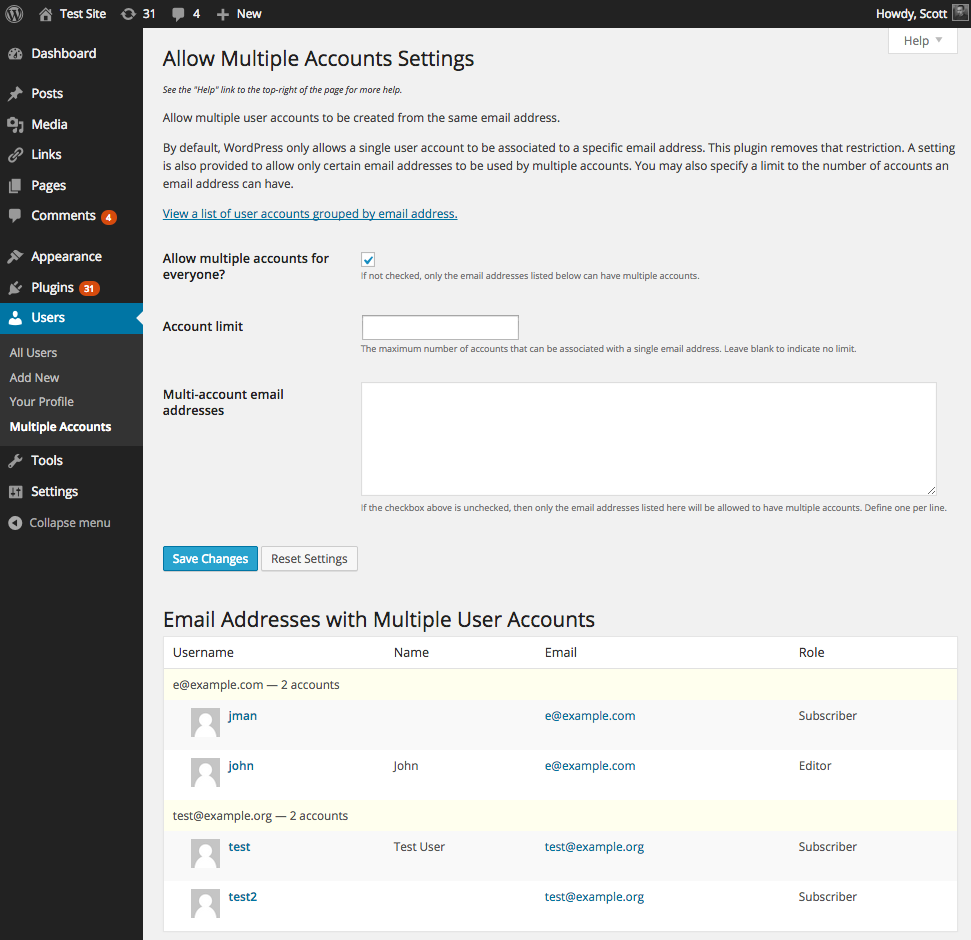
A screenshot of the plugin’s admin settings page.
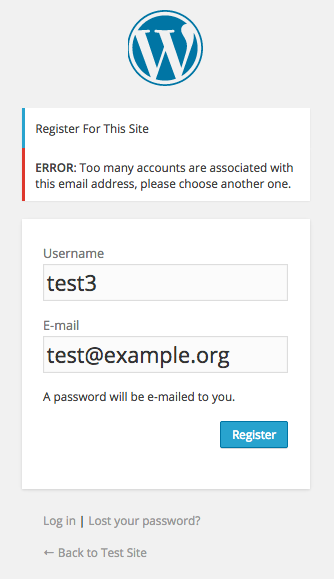
A screenshot of a registration attempt failing due to exceeding the limit on the number of allowed multiple accounts.

A screenshot of the error message shown on a user’s profile whose email address change failed due to exceeding the limit on the number of allowed multiple accounts.
-
Installation
- Whether installing or updating, whether this plugin or any other, it is always advisable to back-up your data before starting
- Unzip
allow-multiple-accounts.zipinside the/wp-content/plugins/directory for your site (or install via the built-in WordPress plugin installer) - Activate the plugin through the ‘Plugins’ admin menu in WordPress
- Go to the Users -> Multiple Accounts admin settings page (which you can also get to via the Settings link next to the plugin on the Manage Plugins page) and configure settings. On a Multisite install, go to My Sites -> Network Admin -> Users -> Multiple Accounts.
-
Frequently Asked Questions
Q. Installation Instructions
A.- Whether installing or updating, whether this plugin or any other, it is always advisable to back-up your data before starting
- Unzip
allow-multiple-accounts.zipinside the/wp-content/plugins/directory for your site (or install via the built-in WordPress plugin installer) - Activate the plugin through the ‘Plugins’ admin menu in WordPress
- Go to the Users -> Multiple Accounts admin settings page (which you can also get to via the Settings link next to the plugin on the Manage Plugins page) and configure settings. On a Multisite install, go to My Sites -> Network Admin -> Users -> Multiple Accounts.
Q. Why would I want to allow multiple accounts to be associated with one email address?
A. Maybe your site is one that doesn’t mind if users can sign up for multiple accounts from the same email address, perhaps for different identities. More likely, you as an admin, plugin developer, and/or theme developer would like to be able to create multiple accounts on a site to test various permissions or you just want to test the blog having numerous users and don’t want to have to assign unique email addresses for each account.Q. Can I limit who can create multiple accounts for an email address?
A. Yes. You can specify a limit on how many accounts can be created per email address. You can also explicitly list the email addresses which are allowed to create multiple accounts (useful for just allowing admins to have multiple accounts).Q. How does the plugin affect the “Lost your password?” feature?
A. The clearest method for resetting a forgotten password is to supply the username on the “Lost your password” form when prompted.
If an email address is instead supplied on the form, WordPress will send an email to that address with reset information for the first account found associated with that address. If multiple accounts are associated with that email address, then the email will include a listing of all associated usernames. In order to reset the password for a specific account, go back to the forgotten password form and supply the desired username, or if the email that was sent happens to be for the account that needs the password reset, follow the instructions and link in the email. Bear in mind that the password reset email can be safely disregarded if it relates to an account that shouldn’t be reset.Q. Does this plugin allow existing user accounts to update to share an email address?
A. Yes. Account email address usage is handled for existing accounts as well when they attempt to change their email address. If a user account is updated to try to use an email address that has exceeded its allowable use limit, the change will simply be denied (with an error message; see screenshot 3) and their email address will remain unchanged.Q. What if I allowed email addresses to create up to 5 accounts and some people did so. Then I lowered the limit to 2. What happens now that some email accounts exceed the current limit?
A. Nothing happens. The plugin does not enforce anything with existing accounts. Those email addresses will not be able to create new accounts because they exceed the current limits. However, if one of those accounts changes their email address to something else and then tries to change back, then won’t be able to do so because the limit of 2 will prevent them from switching to that particular email address (since there would still be 4 other accounts using the email address in this hypothetical scenario).Q. Is this Multisite compatible?
A. Yes.Q. Is this BuddyPress compatible?
A. Yes.Q. In Multisite, why do I get this error message when trying to register for another account with an already used email address: “That email address has already been used. Please check your inbox for an activation email. It will become available in a couple of days if you do nothing.”
A. If you’re seeing that error then it means the email address used for the new registration matches one used by an account in the signups table. Basically, an account has been registered with that email address but has not been activated yet. Only one account can be in this registered-but-not-activated state per email address.
Before that email address can be used for another account, you have to activate that pending account, delete the pending account from the signups table, or wait a couple of days until the pending account expires. -
Release Log
3.0.4 (2015-07-14)
- Change: Don’t attempt to remap (even if only briefly) the email address for user updates when the email address hasn’t been changed
3.0.3 (2015-07-09)
- Bugfix: Hook ‘profile_update’ and ‘user_register’ at higher priority to avoid conflicting with other plugins (e.g. MailPoet, MailPress)
- Update: Hook ‘pre_user_email’ and ‘pre_user_login’ at lower priority to avoid potentially conflicting with other plugins
- Update: Remap user email more precisely using user ID instead of email (though no problems noted with the old approach)
3.0.2 (2015-04-16)
- Bugfix: compatibility fix for versions of WP older than 4.1;
$error->remove()was introduced in 4.1 - Update: Note compatibility through WP 4.2+
3.0.1 (2015-04-10)
- Bugfix: add omitted code to
count_multiple_accounts()to account for $user_id arg potentially being an object
3.0 (2015-03-26)
- Reimplement necessary workaround to WP’s shortcoming in facilitating repeated use of email addresses
- Fix outdated error handling
- Fix
has_exceeded_limit()to account for ‘account_limit’ not being set and ‘allow_for_everyone’ being false - Fix
has_exceeded_limit()to account for ‘account_limit’ not being set and ‘allow_for_everyone’ being true - Omit listing email addresses associated with only 1 account on the settings page “Email Addresses with Multiple User Accounts” listing
- Add new hack functions:
hack_pre_user_login(),hack_pre_user_login(),hack_restore_remapped_email_address() - Remove long deprecated functions:
count_multiple_accounts(),get_users_by_email(),has_multiple_accounts() - Remove no longer needed hack functions:
get_user_by_email()get_user_by()display_activation_notice()hack_check_passwords()hack_pre_user_display_name()
- Remove no longer needed hack class variables: during_user_creation, controls_get_user_by
- Add new hack class variables: hack_user, hack_remapped_emails
- Indent user listings in table on settings page to indicate they are being listed according to email address
- Update plugin framework to 039
- Change default input type for ‘account_limit’ setting from ‘text’ to ‘int’
- Better singleton implementation:
- Add
get_instance()static method for returning/creating singleton instance - Make static variable ‘instance’ private
- Make constructor protected
- Make class final
- Additional related changes in plugin framework (protected constructor, erroring
__clone()and__wakeup())
- Add
- Add unit tests
- Explicitly declare
activation()anduninstall()static - Add checks to prevent execution of code if file is directly accessed
- Change use of “e-mail” to “email”
- Re-license as GPLv2 or later (from X11)
- Reformat plugin header
- Add ‘License’ and ‘License URI’ header tags to readme.txt and plugin file
- Use explicit path for
require_once() - Discontinue use of PHP4-style constructor
- Discontinue use of explicit pass-by-reference for objects
- Remove ending PHP close tag
- Documentation improvements (inline and readme)
- Minor code reformatting (spacing, bracing)
- Change documentation links to wp.org to be https
- Note compatibility through WP 4.1+
- Drop compatibility with version of WP older than 3.6
- Update copyright date (2015)
- Regenerate .pot
- Change donate link
- Add assets directory to plugin repository checkout
- Update screenshots
- Add third screenshot
- Move screenshots into repo’s assets directory
- Add banner
- Add icon
2.6.2
- Fix for WP 3.2.x to prevent warning notice unnecessarily appearing in admin
2.6.1
- Fix for WP 3.2.x (need to override get_user_by_email() again instead of get_user_by() – but just for WP < 3.3)
2.6
- Add/fix multisite support
- Remove get_user_by_email() override function
- Override get_user_by() to circumvent check for email existence
- Show admin notice if unable to override get_user_by()
- Update plugin framework to 033
- Remove support for ‘c2c_allow_multiple_accounts’ global
- Note compatibility through WP 3.3+
- Change parent constructor invocation
- Create ‘lang’ subdirectory and move .pot file into it
- Regenerate .pot
- Add more FAQs
- Minor phpDoc reformatting
- Add ‘Domain Path’ directive to top of main plugin file
- Add link to plugin directory page to readme.txt
- Tweak installation instructions in readme.txt
- Update screenshots for WP 3.3
- Update copyright date (2012)
2.5
- Fix user listing error by adapting older user_row() into class function
- Add support for BuddyPress
- Add bp_members_validate_user_signup()
- Fix has_exceeded_limit() to account for the account_limit applying to certain emails and not everyone
- Fix to properly register activation and uninstall hooks
- Add filters ‘c2c_count_multiple_accounts’, ‘c2c_get_users_by_email’, and ‘c2c_has_multiple_accounts’ to respond to the function of the same name so that users can use the apply_filters() notation for invoking template tags
- Use get_users() rather than direct query
- Remove Posts (which provided count of posts) from multi-account user listing table
- Update plugin framework to 023
- Save a static version of itself in class variable $instance
- Deprecate use of global variable $c2c_allow_multiple_accounts to store instance
- In global space functions: use new class instance variable to access instance instead of using global
- Rename class from ‘AllowMultipleAccounts’ to ‘c2c_AllowMultipleAccounts’
- Add __construct(), activation(), uninstall()
- Note compatibility through WP 3.2+
- Drop support for versions of WP older than 3.1
- Add more FAQ questions
- Call _deprecated_function() on deprecated functions to generate proper notices/warnings
- Add filters section to readme.txt and document filters
- Explicitly declare functions public
- Minor code formatting changes (spacing)
- Update copyright date (2011)
- Add plugin homepage and author links in description in readme.txt
2.0.1
- Update plugin framework to C2C_Plugin_016 (fixes WP 2.9.2 compatibility issues)
2.0
- Fix compatibility with MU/Multi-site
- Fix bug preventing admins from editing the profile of an account
- Re-implementation by extending C2C_Plugin_011, which among other things adds support for:
- Reset of options to default values
- Better sanitization of input values
- Offload of core/basic functionality to generic plugin framework
- Additional hooks for various stages/places of plugin operation
- Easier localization support
- Full localization support
- Move count_multiple_accounts() to c2c_count_multiple_accounts()
- Deprecate count_multiple_accounts(), but retain it (for now) for backwards compatibility
- Move get_users_by_email() to c2c_get_users_by_email()
- Deprecate get_users_by_email(), but retain it (for now) for backwards compatibility
- Move has_multiple_accounts() to c2c_has_multiple_accounts()
- Deprecate has_multiple_accounts(), but retain it (for now) for backwards compatibility
- Rename global instance variable from allow_multiple_accounts to c2c_allow_multiple_accounts
- Explicitly ensure $allow_multiple_accounts is global when instantiating plugin object
- Note compatibility with WP 3.0+
- Add ‘Text Domain’ header tag
- Add omitted word in string
- Minor string variable formatting changes
- Update .pot file
- Minor code reformatting (spacing)
- Add PHPDoc documentation
- Add package info to top of plugin file
- Remove docs from top of plugin file (all that and more are in readme.txt)
- Remove trailing whitespace in header docs
- Add Template Tags and Upgrade Notice sections to readme.txt
1.5
- Fixed bug causing ‘Too many accounts…’ error to be incorrectly triggered
- For retrieve password request emails, if the account is one associated with multiple accounts, list those account names in the email for informational purposes
- Added class functions: count_multiple_emails(), get_users_by_email(), has_multiple_emails()
- Exposed new class functions for external use via globally defined functions: count_multiple_emails(), get_users_by_email(), has_multiple_emails()
- Changed invocation of plugin’s install function to action hooked in constructor rather than in global space
- Update object’s option buffer after saving changed submitted by user
- Finalized full support for localization
- Parameterized textdomain name
- Used _n() instead of deprecated __ngettext()
- Supported swappable arguments in translatable string
- Miscellaneous tweaks to update plugin to my current plugin conventions
- Noted compatibility with WP2.9.1
- Dropped compatibility with versions of WP older than 2.8
1.1
- Added handling for admin creation of users for WP2.8
- Improved query
- Changed permission check
- More localization-related work
- Removed hardcoded path
- Noted WP2.8 compatibility
1.0
- Initial release
-
Copyright & Disclaimer
Copyright © 2009-2024 by Scott Reilly (aka coffee2code)This program is free software; you can redistribute it and/or
modify it under the terms of the GNU General Public License
as published by the Free Software Foundation; either version 2
of the License, or (at your option) any later version.This program is distributed in the hope that it will be useful,
but WITHOUT ANY WARRANTY; without even the implied warranty of
MERCHANTABILITY or FITNESS FOR A PARTICULAR PURPOSE. See the
GNU General Public License for more details.You should have received a copy of the GNU General Public License
along with this program; if not, write to the Free Software
Foundation, Inc., 51 Franklin Street, Fifth Floor, Boston, MA 02110-1301, USA. -
Discussion / Support
Have any questions, comments, or suggestions? Please provide them via the plugin’s WordPress.org support forum. I’ll do my best to reply in a timely fashion and help as best I can.
Unfortunately, I cannot provide guaranteed support, nor do I provide support via any other means.
Was this plugin useful useful to you? Consider giving it a rating. If you’re inclined to give it a poor rating, please first post to the support forum to give me a chance to address or explain the situation.
Categories
2 replies on “Allow Multiple Accounts”
[…] The Allow Multiple Accounts plugin does not currently work in WP 2.8 if you thought that might be a potential […]
[…] Plugin-Name: Allow Multiple Accounts | Download hier […]