- Author: Scott Reilly
- Version: 2.5
- First released: 2010-09-08
- Last update: 2016-04-13
- Compatibility: WP 3.6 – 4.5.31
- Download: [ zip ]
- Description:
Adds the ability to update a post without having WordPress automatically update the post's post_modified timestamp.
-
Extended Description
This plugin allows you to choose to update a post without having WordPress automatically update the post’s post_modified timestamp.
WordPress maintains a post field called post_modified which tracks the date the post was last edited. This value is used by feeds to indicate the latest update to each post or to report the latest updated post. Plugins and themes may also reference the post modification date to call attention to posts that have been updated. However, if an update is such that you don’t want it to be recorded in the post_modified date field (perhaps due to the update being a small formatting/editing change or fixing a typo, or if you just want to keep quiet about an update), then this plugin is for you.
This plugin adds a “Stealth update?” checkbox to the “Publish” box of any post’s or page’s “Edit Post” admin page.
Note: The plugin records when a post is stealth updated, so subsequent edits of the post will have the “Stealth update?” checkbox checked by default.
Links: Plugin Homepage | Plugin Directory Page | Author Homepage
Filters
The plugin is further customizable via two filters. Typically, these customizations would be put into your active theme’s functions.php file, or used by another plugin.
c2c_stealth_update_meta_key (filter)
The ‘c2c_stealth_update_meta_key’ filter allows you to override the name of the custom field key used by the plugin to store a post’s stealth update status. This isn’t a common need.
Arguments:
- $custom_field_key (string): The custom field key to be used by the plugin. By default this is ‘_stealth-update’.
Example:
/**
 * Defines a custom meta key to be used by Stealth Update.
 *
 * @param string $custom_field_key The default custom field key name.
 * @return string
 */
function override_stealth_update_key( $custom_field_key ) {
    return '_my_custom_stealth-update';
}
add_filter( 'c2c_stealth_update_meta_key', 'override_stealth_update_key' );
c2c_stealth_update_default (filter)
The ‘c2c_stealth_update_default’ filter allows you to override the default state of the ‘Stealth Update?’ checkbox.
Arguments:
- $state (boolean): The default state of the checkbox. By default this is false.
- $post (WP_Post): The post currently being created/edited.
Example:
// Have the Stealth Update? checkbox checked by default.
add_filter( 'c2c_stealth_update_default', '__return_true' );
Find out more at the plugin’s WordPress Plugin Repository page.
-
Screenshots
Click to see full-size image.

A screenshot of the ‘Publish’ sidebar box on the Edit Post admin page. The ‘Stealth update?’ checkbox is integrated alongside the existing fields.
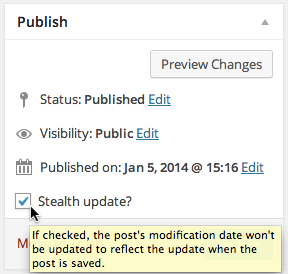
A screenshot of the ‘Stealth update?’ checkbox displaying help text when hovering over the checkbox.

A screenshot of the ‘Stealth update?’ checkbox in the quick edit form.

A screenshot of the lock adjacent to the post date for a post that has stealth update enabled.
-
Installation
- Whether installing or updating, whether this plugin or any other, it is always advisable to back-up your data before starting
- Unzip
stealth-update.zipinside the/wp-content/plugins/directory (or install via the built-in WordPress plugin installer) - Activate the plugin through the ‘Plugins’ admin menu in WordPress
- Click the ‘Stealth update?’ checkbox when updating a post to prevent the date of the update from being saved for the post.
-
Frequently Asked Questions
Q. Why would I want to stealth update a post?
A. This update dates for posts are used by feeds to indicate the latest update to each post or to report the latest updated post. Plugins and other manual uses of some of WordPress’s template tags may also reference the post modification date to call attention to posts that have been updated. However, if an update is such that you don’t want it to be recorded in the post_modified date field (perhaps due to the update being a small formatting/editing change or fix, or if you just want to keep quiet about an update), then this plugin is for you.Q. Can I have the checkbox checked by default?
A. Yes. See the Filters section (under Other Notes) and look for the example using the ‘c2c_stealth_update_default’ filter. You’ll have to put that code into your active theme’s functions.php file. Note that if a post was updated with the checkbox checked, when that post gets edited again the checkbox will be checked by default.Q. Does this plugin include unit tests?
A. Yes. -
Release Log
2.5 (2016-03-25)
2.4.3 (2015-08-09)
- Bugfix: Remove ‘Stealth Update?’ checkbox from quick edit panel as its implementation has since been broken. Potential return in v2.5.
- Update: Note compatibility through WP 4.3+
2.4.2 (2015-02-21)
- Revert to using
dirname(__FILE__); DIR is only supported in PHP 5.3+
2.4.1 (2015-02-17)
- Add more unit tests
- Reformat plugin header
- Use DIR instead of
dirname(__FILE__) - Note compatibility through WP 4.1+
- Change documentation links to w.org to be https
- Minor documentation spacing changes throughout
- Update copyright date (2015)
- Add plugin icon
- Regenerate .pot
2.4 (2014-01-23)
- Add unit tests
- Minor documentation improvements
- Minor code reformatting (spacing, bracing)
- Note compatibility through WP 3.8+
- Drop compatibility with version of WP older than 3.6
- Update copyright date (2014)
- Regenerate .pot
- Change donate link
- Update screenshots
- Add banner
2.3
- Deprecate ‘stealth_update_meta_key’ filter in favor of ‘c2c_stealth_update_meta_key’ (but keep it temporarily for backwards compatibility)
- Don’t allow a blank string from ‘c2c_stealth_update_meta_key’ to override the default meta key name
- Remove private static $textdomain and its use; include textdomain name as string in translation calls
- Remove function
load_textdomain() - Add check to prevent execution of code if file is directly accessed
- Re-license as GPLv2 or later (from X11)
- Add ‘License’ and ‘License URI’ header tags to readme.txt and plugin file
- Regenerate .pot
- Tweak description
- Minor improvements to inline and readme documentation
- Minor code reformatting
- Remove ending PHP close tag
- Remove commented out debugging code
- Note compatibility through WP 3.5+
- Tweak installation instructions in readme.txt
- Update copyright date (2013)
- Move screenshots into repo’s assets directory
2.2.1
- Add version() to return plugin’s version
- Update readme with example and documentation for new filter
- Note compatibility through WP 3.3+
- Update screenshots for WP 3.3
- Use DIRECTORY_SEPARATOR instead of hardcoded ‘/’
- Create ‘lang’ subdirectory and move .pot file into it
- Regenerate .pot
- Add ‘Domain Path’ directive to top of main plugin file
- Add link to plugin directory page to readme.txt
- Update copyright date (2012)
2.2
- Add filter ‘c2c_stealth_update_default’ to allow configuring checkbox to be checked by default
- Note compatibility through WP 3.2+
- Minor code formatting changes (spacing)
- Fix plugin homepage and author links in description in readme.txt
2.1
- Switch from object instantiation to direct class invocation
- Explicitly declare all functions public static and class variables private static
- Note compatibility through WP 3.1+
- Update copyright date (2011)
2.0.2
- Bugfix for auto-save losing value of stealth update status
2.0.1
- Define Text Domain plugin header
- Supply textdomain to localization functions
- Rename class from ‘StealthUpdate’ to ‘c2c_StealthUpdate’
- Add Frequently Asked Questions and Filters sections to readme.txt
- Readme updates
- Add .pot file
2.0
- Add checkbox labeled ‘Stealth update?’ to Publish meta_box rather than requiring direct use of custom fields
- Add class of ‘c2c-stealth-update’ to admin UI div containing checkbox
- Add filter ‘stealth_update_meta_key’ to allow overriding custom field key name
- Re-implemented entire approach
- Remove functions add_js(), admin_menu(), add_meta_box()
- Store plugin instance in global variable, $c2c_stealth_update, to allow for external manipulation
- Full support for localization
- Remove docs from top of plugin file (all that and more are in readme.txt)
- Minor code reformatting (spacing)
- Add PHPDoc documentation
- Note compatibility with WP 3.0+
- Drop compatibility with versions of WP older than 2.9
- Update screenshots
- Update copyright date
- Add package info to top of plugin file
- Add Changelog and Upgrade Notice sections to readme.txt
- First commit to WP plugin repository
1.0
- Initial release
-
Copyright & Disclaimer
Copyright © 2010-2024 by Scott Reilly (aka coffee2code)This program is free software; you can redistribute it and/or
modify it under the terms of the GNU General Public License
as published by the Free Software Foundation; either version 2
of the License, or (at your option) any later version.This program is distributed in the hope that it will be useful,
but WITHOUT ANY WARRANTY; without even the implied warranty of
MERCHANTABILITY or FITNESS FOR A PARTICULAR PURPOSE. See the
GNU General Public License for more details.You should have received a copy of the GNU General Public License
along with this program; if not, write to the Free Software
Foundation, Inc., 51 Franklin Street, Fifth Floor, Boston, MA 02110-1301, USA. -
Discussion / Support
Have any questions, comments, or suggestions? Please provide them via the plugin’s WordPress.org support forum. I’ll do my best to reply in a timely fashion and help as best I can.
Unfortunately, I cannot provide guaranteed support, nor do I provide support via any other means.
Was this plugin useful useful to you? Consider giving it a rating. If you’re inclined to give it a poor rating, please first post to the support forum to give me a chance to address or explain the situation.
Categories
4 replies on “Stealth Update”
[…] Stealth Update […]
[…] Stealth Update […]
[…] Stealth Update […]
[…] to use on the blog, because I do, and yesterday I found a really cool one in Scott Reilly’s Stealth Update […]