- Author: Scott Reilly
- Version: 2.8
- First released: 2010-09-09
- Last update: 2020-02-14
- Compatibility: WP 4.6 – 5.3.17
- Download: [ zip ]
- Description:
Adds the ability to publish a post without triggering pingbacks, trackbacks, or notifying update services.
-
Extended Description
This plugin gives you the ability to publish a post without triggering pingbacks, trackbacks, or notifying update services.
A “Publish silently?” checkbox is added to the “Add New Post” and “Edit Post” admin pages (the latter only for unpublished posts). If checked when the post is published, that post will not trigger the pingbacks, trackbacks, and update service notifications that would typically occur.
In every other manner, the post is published as usual: it’ll appear on the front page, archives, and feeds as expected, and no other aspect of the post is affected.
While trackbacks and pingsbacks can already be disabled from the Add New Post/Page page, this plugin makes things easier by allowing a single checkbox to disable those things, in addition to disabling notification of update services which otherwise could only be disabled by clearing the value of the global setting, which would then affect all authors and any subsequently published posts.
If a post is silently published, a custom field ‘_silent-publish’ for the post is set to a value of 1 as a means of recording the action. However, this value is not used after publish for any purpose as of yet. Nor is the custom field unset or changed if the post is later re-published.
Also see my Stealth Publish plugin if you want to make a new post but prevent it from appearing on the front page of your blog and in feeds. (That plugin incorporates this plugin’s functionality, so you won’t need both.)
Links: Plugin Homepage | Plugin Directory Page | GitHub | Author Homepage
Hooks
The plugin is further customizable via three filters. Code using these filters should ideally be put into a mu-plugin or site-specific plugin (which is beyond the scope of this readme to explain). Less ideally, you could put them in your active theme’s functions.php file.
c2c_silent_publish_meta_key (filter)
The ‘c2c_silent_publish_meta_key’ filter allows you to override the name of the custom field key used by the plugin to store a post’s silent publish status. This isn’t a common need.
Arguments:
- $custom_field_key (string): The custom field key to be used by the plugin. By default this is ‘_silent-publish’.
Example:
/**
 * Defines a custom meta key to be used by Silent Publish.
 *
 * @param string $custom_field_key The default custom field key name.
 * @return string
 */
function override_silent_publish_key( $custom_field_key ) {
    return '_my_custom_silent-publish';
}
add_filter( 'c2c_silent_publish_meta_key', 'override_silent_publish_key' );
c2c_silent_publish_default (filter)
The ‘c2c_silent_publish_default’ filter allows you to override the default state of the ‘Silent Publish?’ checkbox.
Arguments:
- $state (boolean): The default state of the checkbox. By default this is false.
- $post (WP_Post): The post currently being created/edited.
Example:
// Have the Silent Publish? checkbox checked by default.
add_filter( 'c2c_silent_publish_default', '__return_true' );
c2c_silent_publish_post_types (filter)
The ‘c2c_silent_publish_post_types’ filter allows you to override the post types that can be silently published.
Arguments:
- $post_types (array): Array of post type names.
Example:
/**
 * Disable Silent Publish for a custom public post type 'book'.
 *
 * @param array $post_types Array of post type names.
 * @return array
 */
function my_c2c_silent_publish_post_types( $post_types ) {
    $post_types = array_flip( $post_types );
    unset( $post_types[ 'book' ] );
    return array_keys( $post_types ).
}
add_filter( 'c2c_silent_publish_post_types', 'my_c2c_silent_publish_post_types' );
Find out more at the plugin’s WordPress Plugin Repository page.
-
Screenshots
Click to see full-size image.
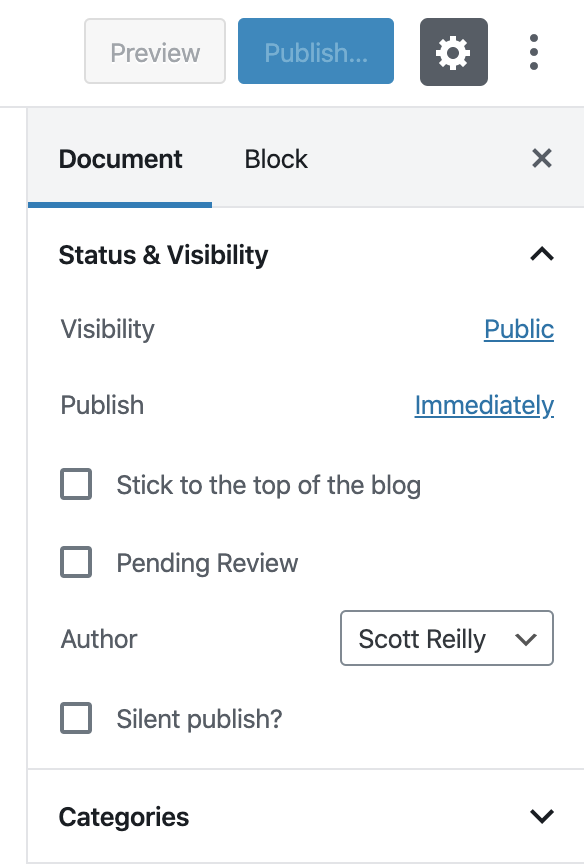
The “Status & Visibility” panel when creating a new post (when using the block editor) that shows the ‘Silent publish?’ checkbox used to enable silent publish. If you plan to make use of it, be sure to have it checked before publishing the post.

The “Status & Visibility” panel when editing a post that was published with silent publish enabled. The message “This post was silently published.” is shown to indicate the post was silently published. If the post has been published without silent publish enabled, no text or checkbox would be shown in its place.

The ‘Publish’ sidebar box on the Add New Post admin page (for versions of WordPress older than 5.0, or later if the new block editor aka Gutenberg is disabled). The ‘Publish silently?’ checkbox is integrated alongside the existing fields.

The ‘Publish’ sidebar box when editing a post (under the classic editor) that was published with silent publish enabled. The message “This post was silently published.” is shown to indicate the post was silently published. If the post has been published without silent publish enabled, no text or checkbox would be shown in its place.

The ‘Silent publish?’ checkbox displaying help text when hovering over the checkbox.
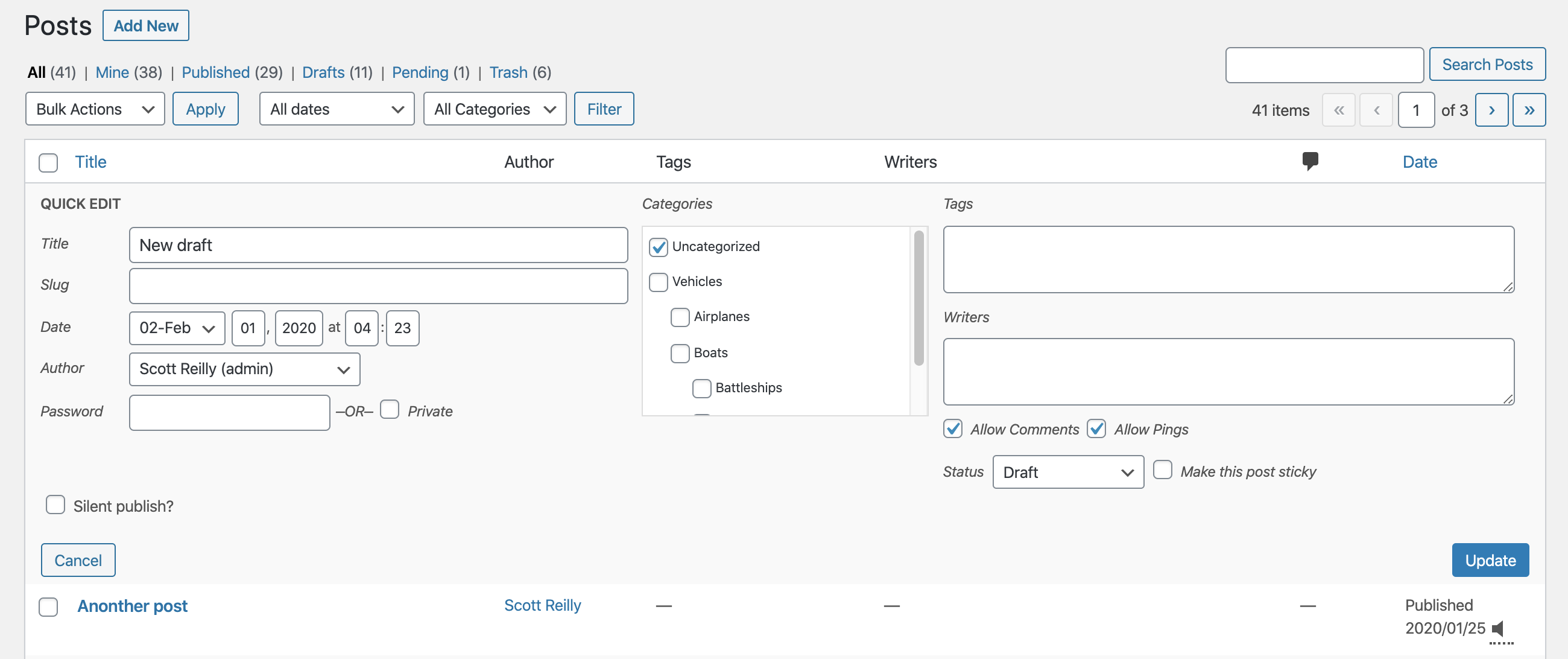
The quick edit panel, which also includes the ‘Silent publish?’ checkbox allowing the feature to be enabled for unpublished posts. And as seen in screenshots 2 and 4, if the post was already silently published the checkbox would instead display the message “This post was silently published.”.

The admin post listing of posts showing the mute icon in the ‘Date’ column to indicate the post was (or will be) silently published.
-
Installation
- Whether installing or updating, whether this plugin or any other, it is always advisable to back-up your data before starting
- Install via the built-in WordPress plugin installer. Or download and unzip
silent-publish.zipinside the plugins directory for your site (typicallywp-content/plugins/) - Activate the plugin through the ‘Plugins’ admin menu in WordPress
- Click the ‘Publish silently?’ checkbox when publishing a post to prevent triggering of pingbacks, trackbacks, or notifications to update services.
-
Frequently Asked Questions
Q. Why would I want to silent publish a post?
A. Perhaps for a particular post you don’t want any external notifications sent out. If checked when the post is published, that post will not trigger the pingbacks, trackbacks, and update service notifications that might typically occur.Q. Can I have the checkbox checked by default?
A. Yes. See the Filters section (under Other Notes) and look for the example using the ‘c2c_silent_publish_default’ filter. You’ll have to put that code into your active theme’s functions.php file or a mu-plugin file.Q. Why is the “Silent publish?” checkbox disabled?
A. If the “Silent publish?” checkbox had been checked at the time a post is published, the field will be shown but will disabled for that published post. Once a post is published, changing the value of the checkbox has no meaning, so there is no need to make it checkable. If you unpublish the post, the checkbox will again be clickable.Q. Why did the “Silent publish?” checkbox disappear?
A. If the “Silent publish?” checkbox had not been checked at the time a post is published, the field will no longer be shown for that published post. Once a post is published, changing the value of the checkbox has no meaning, so there is no need to show it. If you unpublish the post, the checkbox will reappear.Q. Can I change my mind after I silently publish a post to post it again without it being silent?
A. Yes. You must first unpublish the post (by making it a draft or pending). Then uncheck the “Publish silently?” checkbox and republish the post. However, it’s a bit moot at that point; once a post has been published without having silent publish enabled for it then pingbacks, trackbacks, and other notifications about the post being published have already been sent.Q. Does this prevent email notifications from going out to people subscribed to receive a notice about new posts to the site?
A. No.Q. Does this prevent the post being automatically shared to, or announced on, social media sites (Facebook, Twitter, etc)?
A. No. your posts will continue to be shared to social media sites upon publication (assuming it is configured to do so by whatever plugins you have in place to share your posts).Q. Does this plugin include unit tests?
A. Yes. -
Release Log
2.8 (2020-02-09)
- This feature-packed release adds support for setting and viewing the silent publish status in the quick edit panel, adds an icon indicator in the post listing for posts that were (or will be) silent published, shows a message instead of a disabled checkbox when editing a silently published post, adds support for all public post types, notes compatibility through WP 5.3+, and much more internally.
Details:
- New: Add icon to ‘Date’ column of post listing to indicate posts that were or will be silently published
- New: Allow the “Silent Publish?” value to be set and seen in the quick edit pane
- New: Add
add_to_quick_edit() - New: Add
admin_enqueue_scripts()
- New: Add
- New: Add
is_silent_published()to determine if silent publish is activated for a post - Change: Alter
is_silent_publish_on_by_default()to solely reflect the default state of silent publish for new posts - Fix: Don’t output field as if post was silently published if it wasn’t but the field default was filtered to be true
- New: Add TODO.md and move existing TODO list from top of main plugin file into it (and add more items to the list)
- Change: Show message instead of disabled checkbox when editing silently published post and show nothing for published posts that weren’t silently published
- Change: Enable plugin functionality for all public post types by default
- New: Add
get_post_types()for retrieving post types - New: Add filter
c2c_silent_publish_post_typesto filter post types
- New: Add
- Change: Don’t do anything for posts of a post type that is not public
- Change: Extract markup handling from
add_ui()into newoutput_field() - Change: Update JavaScript dependencies and rebuild JS code
- Change: Include ‘c2c-silent-published’ class for label when field is diabled
- Change: Remove unnecessary inline CSS that lowered opacity for disabled field
- Unit tests:
- New: Add helper function
create_post() - Change: Explicitly test priority value of hooks instead of simply that they’re set
- Change: Refactor some unit tests
- New: Add helper function
- Change: Note compatibility through WP 5.3+
- Change: Use full URL for readme.txt link to full changelog
- Change: Split paragraph in README.md’s “Support” section into two
- Change: Add link to CHANGELOG.md in README.md
- Change: Update copyright date (2020)
- New: Add 4 new screenshots (including for block editor UI) and update existing 2 screenshots
2.7 (2019-03-12)
- New: Add support for new block editor (aka Gutenberg)
- New: Add
is_silent_publish_on_by_default()to determine if silent publish should be enabled for posts by default - New: Add
register_meta()and properly register the existence of the post meta field - New: Add CHANGELOG.md and move all but most recent changelog entries into it
- New: Add inline documentation for hooks
- New: Add .gitignore file
- Fix: Check if there is actually a global post in
is_silent_publish_on_by_default()before attempting to use it - Fix: Use proper variable name when obtaining default meta key name
- Change: Initialize plugin on ‘plugins_loaded’ action instead of on load
- Change: Merge
do_init()intoinit() - Change: Update unit test install script and bootstrap to use latest WP unit test repo
- Change: Use
apply_filters_deprecated()to formally deprecate the ‘silent_publish_meta_key’ filter - Fix: Correct typo in GitHub URL
- Change: Note compatibility through WP 5.1+
- Change: Update copyright date (2019)
- Change: Update License URI to be HTTPS
2.6.1 (2018-07-12)
- New: Add README.md
- New: Add GitHub link to readme
- Bugfix: Fix a pair of unit tests by correctly applying
do_action()instead ofapply_filters() - Change: Minor whitespace tweaks to unit test bootstrap
- Change: Note compatibility through WP 4.9+
- Change: Rename readme.txt section from ‘Filters’ to ‘Hooks’
- Change: Modify formatting of hook name in readme to prevent being uppercased when shown in the Plugin Directory
- Change: Update copyright date (2018)
-
Copyright & Disclaimer
Copyright © 2010-2024 by Scott Reilly (aka coffee2code)This program is free software; you can redistribute it and/or
modify it under the terms of the GNU General Public License
as published by the Free Software Foundation; either version 2
of the License, or (at your option) any later version.This program is distributed in the hope that it will be useful,
but WITHOUT ANY WARRANTY; without even the implied warranty of
MERCHANTABILITY or FITNESS FOR A PARTICULAR PURPOSE. See the
GNU General Public License for more details.You should have received a copy of the GNU General Public License
along with this program; if not, write to the Free Software
Foundation, Inc., 51 Franklin Street, Fifth Floor, Boston, MA 02110-1301, USA. -
Discussion / Support
Have any questions, comments, or suggestions? Please provide them via the plugin’s WordPress.org support forum. I’ll do my best to reply in a timely fashion and help as best I can.
Unfortunately, I cannot provide guaranteed support, nor do I provide support via any other means.
Was this plugin useful useful to you? Consider giving it a rating. If you’re inclined to give it a poor rating, please first post to the support forum to give me a chance to address or explain the situation.
Categories
One reply on “Silent Publish”
[…] viaSilent Publish | coffee2code.com. Dieser Beitrag wurde unter WordPress veröffentlicht. Setze ein Lesezeichen auf den Permalink. ← Pythagoras Kepler System WordPress › The Events Calendar « WordPress Plugins → […]