- Author: Scott Reilly
- Version: 0.9.14
- First released: 2012-01-04
- Last update: 2012-01-24
- Compatibility: WP 3.3 – 3.3.2
- Download: [ zip ]
- Description:
Easily keep track of the last time you interacted with your contacts.
-
Extended Description
Easily keep track of the last time you interacted with your contacts.
NOTE: This plugin is currently considered experimental. The implementation and/or interface may change, and features may be added or removed. Attempts will be made to ensure data viability through subsequent releases but is not guaranteed. Not recommended for use on a live production site.
This plugin allows for contacts and contact groups to be imported from Google Contacts (and in future releases, other contact services) into a WordPress installation. The contacts can then be managed to keep track of the details about your interactions with each contact. You can record:
- Date you contacted the person
- The method used to contact the person (email, IM, phone, in person)
- A brief note about the interaction (optional)
Links: Plugin Homepage | Plugin Directory Page | Author Homepage
Credits
Thanks to (PC.DE)[http://pc.de/icons/] for the Berlin icons used by the plugin.
Thanks to Yusuke Kamiyamane, by way of Randy Jensen, for the Fugue icons used in the menus.
TODO
BUGS/MINOR
- Properly report failed OAuth authentication
- Extract import stuff from LastContacted and put into dedicated class
- Remove non-sprited versions of sprited icons
- Dashboard widget: reinstate hide contact button for dashboard
ENHANCEMENTS
- Prefix all CSS classes with “lc_”
- Summarize stats for each import (when manually performed) (i.e. X groups added/removed, X contacts added/removed)?
- Expose date for when group/contact first got imported?
- Expose name of contact source for each contact?
- Require registration of contact services (rather than having Google Contacts assumed)
- Use wp_remote_get|post methods to contact Google
- Display time since rather than date of last contact? (“5 days ago” vs “2011-11-01”)
- Pseudo-cron (or at least expire) knowledge about contacts not having Gravatar
FEATURES
- Allow access to contact history beyond most recent (popup? embedded listing that needs to be expanded?)
- Show multiple email addresses for contact if there are more than one?
- Support multiple contact sources
- Recognize a contact from across multiple contact sources
- Handle name collisions (may be same or different person)
- Handle same contact with different name under each source (perhaps via manual merge capability)
- Sparklines for frequency of contacting per contact
- Support multiple users : either each user manages their own contacts (walled gardens) or one user is designated the master and all users share in contacting that person’s contacts (community garden) (i.e. so it can be a team tool)
- Support addition (and removal) of contact methods
Find out more at the plugin’s WordPress Plugin Repository page.
-
Screenshots
Click to see full-size image.

A screenshot of the main plugin page for managing groups and contacts.

A screenshot of the contact services import page.
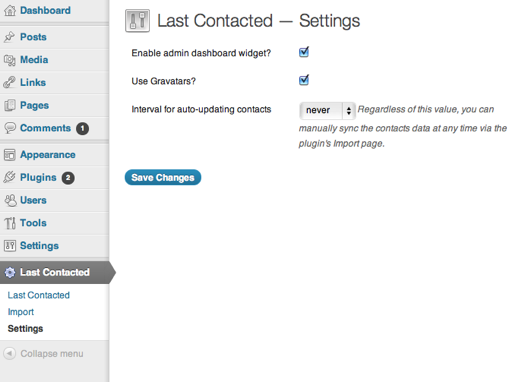
A screenshot of the plugin settings page.

A screenshot of the admin dashboard widget.
-
Installation
- Be aware the plugin is still in an experimental state. It is not recommended for use on a production site just yet.
- Whether installing or updating, whether this plugin or any other, it is always advisable to back-up your data before starting
- Unzip
last-contacted.zipinside the/wp-content/plugins/directory - Activate the plugin through the ‘Plugins’ admin menu in WordPress
- Go to the ‘Import’ link under the top-level admin menu for the plugin and follow the directions for importing your contacts.
-
Frequently Asked Questions
Q. Why is this plugin currently considered experimental?
A. Development is still ongoing. The implementation, interface, and feature set are liable to change, and if so, possible without regard to backward compatibility. The 1.0 release will signify plugin stability. However, feel free to try things out on a test installation. I welcome the feedback!Q. Will this support importing my contacts from a service other than Google Contacts?
A. In the future, yes; an API will allow support for other contact services. At present, no; only Google Contacts is supported.Q. Can I manage my contacts via this plugin?
A. No. This plugin provides an interface for managing when you contacted your contacts. It does not provide a means for managing contacts themselves. By that I mean you can’t add contacts, edit contact details, assign/deassign contacts to groups, etc with this plugin. Nothing you do ever gets pushed up to the contact service (i.e. Google Contacts). Use the contact service to manage your contacts. -
Release Log
0.9.14
- Add search box with autocomplete to find and highlight contact(s)
- Search box gets initial focus on page load
- Search is an AJAX-powered auto-complete for contact’s full name (kicks in after 3 characters)
- Selected searched contact is added to search list and behaves as full instance of the contact
- Selected searched contact gets all of their instances within groups highlighted to stand out
- Multiple contacts can be searched and listed
- Selected searched contacts can be individually removed from search list, or removed en masse
- If there are multiple selected searched contacts, then multi-contact pseudo-contact appears,
which allows for making note of having contacted all of the listed search contacts using same
info - (currently present but not functional in admin dashboard widget)
- Significantly reduce the number of queries performed on page load
- Prevent long notes from expanding width of contact’s popup
- Add support for ‘fields’ setting for group/contact queries and only SELECT those fields
- Only COALESCE comments when explicitly configured to do so
- Add custom icon for plugin’s top-level menu link
- Always enqueue general.css (now that plugin menu icon is used)
- Fix bug with disappearing meta when hiding/unhiding contacts
0.9.13
- Shrink popup trigger zone so as not to encompass right 1/4 of group’s contacts listing (facilitates scrolling)
- Don’t show contact form by default on contact popup
- Add hover zone on bottom of contact popup to trigger display of contact form
- Add link to hide/close contact form button when it is expanded
- …(once opened, contact form stays displayed until explicitly hidden or form is submitted)
- Hide contact form after newly-contacted submission
- Move ‘Hide’ contact button out from under avatar and to far right of contact’s name
- Don’t show hide contact button by default on contact popup
- Hovering over contact name reveals hide button
- Expose CPTs (temporarily?)
- Add icons for CPT menus
- Fix contact popup vertical positioning for contacts with names that wrap
- Use WP-bundled jQuery UI and effects scripts
- Define min-width for contact popups
- Wrap note for latest contact in popup with
<em> - Drop support for WP 3.1+, 3.2+
0.9.12
- Initial public availability (still an alpha release)
0.9.11
- Add setting ‘use_gravatar’ and use it to toggle the use of Gravatars (default is on)
- Add template tag lc_get_avatar()
- Retrieve Gravatar only once per user and resize in browser
- Add ability (via Import page) to pre-fetch from Gravatar to determine (and record) which contacts don’t have Gravatars
- Don’t make requests to Gravatar for contacts known not to have an avatar
- Show transparent image if contact has no Gravatar
- Use white as bg for images to give blank appearance for those without avatar
- …also gives thinner border around popup avatar
- Add and use sprite.png, which combines the four contact method images (and transparent image)
- Hook dashboard widget disabler to ‘load-index.php’ rather than ‘plugins_loaded’
- Add settings_error() call to settings and import pages
- Relocate ‘Hide’ contact button to under the avatar, which frees up some vertical space and is in better spot
- Remove the ‘Hide form’ link since it became useless
0.9.10
- Fix hardcoded image reference to wp-content directory
- Hook backdoor delete handler to ‘load-index.php’ rather than checking $pagenow on ‘admin_init’
- Hook dashboard widget initialization to ‘load-index.php’ rather than ‘plugins_loaded’
- Add some padding to bottom of contact details popup
- Explicitly post settings to admin_url(‘options.php’) rather than ‘options.php’
0.9.9
- Run init() always to allow front-end filtering of ‘comment_clauses’
- …but do nothing else unless in the admin
- Run admin dashboard specific hook on ‘load-index.php’ instead of checking $pagenow
- Add on_load()
- Modify OAuth.php to prepend all classes and references to them with ‘C2C_’ to avoid conflicts with other plugins
- CSS tweak for contact method button/image
- Prevent PHP notice if there are no groups to import during import
- Minor code reformatting (spacing)
0.9.8
- Prevent notes on contacts from being listed as comments elsewhere
- Fix broken ‘Settings’ plugin action link
- Fix configuring of OAuth scope value
- Fix OAuth callback URLs to be plugin’s import page rather than admin dashboard widget’s configure panel
- Add on-screen help text for cron_interval setting
- Add c2c_LastContacted::version() to return string for current version number
- Note compatibility through WP 3.3+
0.9.7
- Add ability to list hidden contacts and un-hide them
- Fix JS to reset note field after submitting newly contacted form
0.9.6
- Move all but main PHP files into lib/
- Abstract path and URL locations into methods
- Split out OAuth stuff from google-contacts.php into separate class in google-oauth.php
- Less dramatic contact popup boxshadow
- Add TODO section to readme
0.9.5
- Remove (orphan) groups from listings when they have disappeared at contact source
- Remove (orphan) contacts when they have disappeared from all groups at contact source
- De-associate contacts who have been removed from a group at contact source
- Delete orphaned contacts who have never been contacted
- Delete orphaned groups which have no contacts
- Add pseudo-cron auto-updating of contacts from contact sources (with dropdown setting for cron interval: never, daily, weekly, monthly)
- Enhance do_query() to support doing date comparisons when ‘post_modified’ condition is set (and optional ‘post_date_comparator’)
- Enhance handle_import() to allow for programmatic invocation (not just form submission handling)
0.9.4
- Add boxshadow to admin page contact popups
- Retrieve groups/contacts only for current user
- Don’t display who last contacted the contact (always current user now)
- Record and report the date the last time data was imported from each contact source
- Add support for plugin settings:
- Add settings code file, last-contacted.settings.php
- Add settings template file, settings.php
- For c2c_LastContacted and c2c_LastContactedAdmin: have init() launch do_init() during ‘plugins_loaded’, so that things can be filtered
- Add setting to, and support for, disable/enable admin dashboard widget
- Fix miscellaneous bugs
0.9.3
- Split out admin dashboard functionality into its own class and resource files
- Introduce admin page functionality with its own class and resource files
- Add shared resource files (js/common.js and css/common.css)
- Split out contents of js/admin.js and js/admin.css into dashboard resource files as appropriate
- Ensure JS and CSS are only enqueued on appropriate admin pages
- Add mini gravatar to each contact’s list item
- Within group listings but before contacts listing, show count of contacts and hide button
- Move hide button from bottom of contacts listing to top
- Add ability to list and restore hidden groups
- Add c2c_LastContacted::count_contacts() to return count of contacts for specified group
- For JS triggered when hiding contact:
- Hide other instances of the contact
- Update (decrement) count for all groups containing an instance of contact being hidden
- Update Google Contacts API lib
- Add filter ‘c2c_google_contacts-base_admin_path’
- Add filter ‘c2c_google_contacts-base_query_args’
- Always require OAuth.lib
- Add more phpDoc
- Integrate contacts importing into admin page
- Add template files import.php and _import.php to share markup between widget and admin page (extracted from dashboard)
- Hook into new Google Contacts API lib to customize URLs
- Add c2c_LastContactedAdmin::admin_page_url() to get URL for admin page
- Add _flash.php to share message display
- Register listener for c2c_LastContactedAdmin to handle processing of import request or display of import page
- Add c2c_LastContacted::handle_import() to process imports
- On admin page, display contact details in tooltip
- Auto-scroll to position contact gets resorted to (and highlight the contact to denote its new position)
0.9.2
- Don’t allow notes to be listed in ‘Recent Comments’ admin dashboard widget
0.9.1
- Auto-scroll after contacted-at form submission to ensure contact is still visible in viewport
0.9
- Initial release= 0.9.13 =
- Recommended update: smaller contact popup hover zone; don’t show form by default; move ‘hide contact’ button; dropped support for WP 3.2
- Add search box with autocomplete to find and highlight contact(s)
-
Copyright & Disclaimer
Copyright © 2012-2024 by Scott Reilly (aka coffee2code)This program is free software; you can redistribute it and/or
modify it under the terms of the GNU General Public License
as published by the Free Software Foundation; either version 2
of the License, or (at your option) any later version.This program is distributed in the hope that it will be useful,
but WITHOUT ANY WARRANTY; without even the implied warranty of
MERCHANTABILITY or FITNESS FOR A PARTICULAR PURPOSE. See the
GNU General Public License for more details.You should have received a copy of the GNU General Public License
along with this program; if not, write to the Free Software
Foundation, Inc., 51 Franklin Street, Fifth Floor, Boston, MA 02110-1301, USA. -
Discussion / Support
Have any questions, comments, or suggestions? Please provide them via the plugin’s WordPress.org support forum. I’ll do my best to reply in a timely fashion and help as best I can.
Unfortunately, I cannot provide guaranteed support, nor do I provide support via any other means.
Was this plugin useful useful to you? Consider giving it a rating. If you’re inclined to give it a poor rating, please first post to the support forum to give me a chance to address or explain the situation.