- Author: Scott Reilly
- Version: 2.2
- First released: 2009-07-15
- Last update: 2017-02-22
- Compatibility: WP 4.6 – 4.7.28
- Download: [ zip ]
- Description:
Admin widget on the Add/Edit Post pages for inserting HTML encodings of special characters into the post.
-
Extended Description
Add an admin widget labeled “HTML Special Characters” that is present in the admin Add/Edit Post and Add/Edit Page pages. Clicking on any special character in the widget causes its character encoding to be inserted into the post body text field at the current cursor location (or at the end of the post if the cursor isn’t located in the post body field). Hovering over any of the special characters in the admin widget causes hover text to appear that shows the HTML entity encoding for the character as well as the name of the character.
Note that when used in the visual editor mode the special character itself is added to the post body. Also note that the visual editor has its own special characters popup helper accessible via the advanced toolbar, which depending on your usage, may make this plugin unnecessary for you. In truth, the plugin is intended more for the non-visual (aka HTML) mode as that is the mode I (the plugin author) use.
Links: Plugin Homepage | Plugin Directory Page | Author Homepage
Filters
The plugin exposes two filters for hooking. Typically, code making use of filters should ideally be put into a mu-plugin or site-specific plugin (which is beyond the scope of this readme to explain).
c2c_html_special_characters (filter)
The ‘c2c_html_special_characters’ hook allows you to remove existing characters or entire groups of characters, and/or add new characters or groups of characters.
Arguments:
- $codes (array) : An association array in which the keys are a grouping name and the values are associative arrays themselves with the code as the key and the human-friendly descriptions as the values.
Example:
/**
 * Add a new grouping of characters (accented 'A's).
 *
 * @param array $characters Default HTML special characters.
 * @return array
 */
function more_html_special_characters( $characters ) {
    $characters['accented_a'] = array(
        'name'     => 'Accented A',
        'À' => 'A grave accent',
        'Á' => 'A accute accent',
        'Â'  => 'A circumflex',
        'Ã' => 'A tilde',
        'Ä'   => 'A umlaut',
        'Å'  => 'A ring',
        'Æ'  => 'AE ligature',
    );
    return $characters; // Important!
}
add_filter( 'c2c_html_special_characters', 'more_html_special_characters' );
c2c_html_special_characters_post_type (filter)
The ‘c2c_html_special_characters_post_type’ hook allows you to specify which post_types for which the HTML Special Characters metabox should be shown.
Arguments:
- $post_types (array) : An array of post types. By default, this value is
array( 'page', 'post' )
Example:
/**
 * Show HTML Special Characters Helper for additional post_types.
 *
 * @param array $post_types Arry of post types.
 * @return array
 */
function more_html_special_characters_post_types( $post_types ) {
    $post_types[] = 'products'; // Show for products
    unset( $post_types['page'] ); // Don't show for pages
    return $post_types;
}
add_filter( 'c2c_html_special_characters_post_types', 'more_html_special_characters_post_types' );
Find out more at the plugin’s WordPress Plugin Repository page.
-
Screenshots
Click to see full-size image.
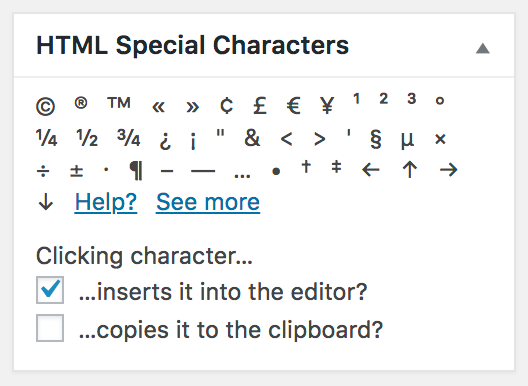
A screenshot of the HTML Special Characters admin widget in its default state

A screenshot of the HTML Special Characters admin widget when “See More” is clicked to display more special characters. Note all characters are categorized into labeled sections

A screenshot of the HTML Special Characters admin widget after “Help?” is clicked

A screenshot of the HTML Special Characters admin widget when the mouse is hovering over one of the special characters. The hover text that appears shows the HTML entity encoding for the character as well as the name of the character
-
Installation
- Install via the built-in WordPress plugin installer. Or download and unzip
html-special-characters-helper.zipinside the plugins directory for your site (typicallywp-content/plugins/) - Activate the plugin through the ‘Plugins’ admin menu in WordPress
- An admin widget entitled “HTML Special Characters” will now be present in your write post and write page forms. Simply click on any character that you would like inserted into your post.
- Install via the built-in WordPress plugin installer. Or download and unzip
-
Frequently Asked Questions
Q. Installation Instructions
A.- Install via the built-in WordPress plugin installer. Or download and unzip
html-special-characters-helper.zipinside the plugins directory for your site (typicallywp-content/plugins/) - Activate the plugin through the ‘Plugins’ admin menu in WordPress
- An admin widget entitled “HTML Special Characters” will now be present in your write post and write page forms. Simply click on any character that you would like inserted into your post.
Q. How do I use the “HTML Special Characters” admin widget to insert special characters into other post fields (such as the post title)?
A. You can’t. The plugin only inserts the HTML character encodings into the post body. However, you can certainly hover over the character you want to use to see the HTML encoding for it (it’ll start with an ampersand,&, and end with a semi-color,;) and type that into the field.Q. I’ve activated the plugin and don’t see the “HTML Special Characters” admin widget when I go to write a post; where is it?
A. Refer to the screenshots to get an idea of what the helper widget looks like. You should find the widget in the right sidebar of the admin page when creating or editing a post, most likely at the bottom of the sidebar. It’s possible it may have been dragged to someplace below the textarea where you provide the post’s content.
If you still can’t find it, look to the upper-right of the page for a “Screen Options” link that reveals a panel of options. In the “Boxes” section, ensure the checkbox for “HTML Special Characters” is checked.Q. Have any references?
A. Try:- www.w3schools.com/tags/ref_entities.asp
- tlt.psu.edu/suggestions/international/web/codehtml.html
- wdvl.internet.com/Authoring/HTML/Entities/
Q. Does this plugin include unit tests?
A. Yes. - Install via the built-in WordPress plugin installer. Or download and unzip
-
Release Log
2.2 (2017-02-07)
- Change: Show helper metabox for all post types shown in the admin.
- Now shown for custom post types that appear in the admin menu
- Add function
get_post_types() - Ensure post type supports the editor before enabling metabox for it
- Change: Add metabox via ‘add_meta_boxes’ hook for a more targeted approach.
- Change: Add version number when registering stylesheet.
- Change: No need to explicitly enqueue jQuery.
- Change: Rename
add_meta_box()to more accuratemeta_box_content(). - Change: Default
WP_TESTS_DIRto/tmp/wordpress-tests-librather than erroring out if not defined via environment variable. - Change: Enable more error output for unit tests.
- Change: Note compatibility through WP 4.7+.
- Change: Remove support for WordPress older than 4.6 (should still work for earlier versions).
- Change: Actually remove /lang subdirectory.
- Change: Minor readme.txt improvements.
- Change: Update copyright date (2017).
- Change: Minor code reformatting (add trailing comma to last array elements).
- New: Add LICENSE file.
2.1 (2016-01-19)
- New: Add assets/ sub-directory and move admin.js and admin.css into it.
- New: Add support for language packs:
- Change textdomain from ‘c2c_hsch’ to ‘html-special-characters-helper’.
- Remove .pot file and /lang subdirectory.
- Remove ‘Domain Path’ from plugin header.
- New: In
do_admin_init(), bail early if an AJAX request is being processed. - New: Create empty index.php to prevent files from being listed if web server has enabled directory listings.
- Change: Remove
do_init()and moveload_plugin_textdomain()intodo_admin_init(). - Change: Use different jQuery .ready() syntax.
- Change: Minor code reformatting (spacing).
- Change: Note compatibility through WP 4.4+.
- Change: Explicitly declare methods in unit tests as public.
- Change: Update screenshots.
- Change: Update copyright date (2016).
2.0.1 (2015-09-08)
- Change: Use
dirname(__FILE__)instead of__DIR__since the latter is only available on PHP 5.3+. - Change: Note compatibility through WP 4.3+.
- Change: Minor spacing tweaks to readme.txt.
2.0 (2015-02-15)
- Add private
get_default_html_special_characters()and move characters data array into it (so default data can be directly retrieved) - Apply ‘c2c_html_special_characters’ filter before checking for a category
- Send value of $category as addition argument to ‘c2c_html_special_characters’ filter
- Add ‘name’ array element to character categories to allow for localized category name labels
- Increase font size for metabox links and make category labels bold
- Add unit tests
- Remove
is_admin()check that prevented class use outside of admin - Cast return value of ‘c2c_html_special_characters_helper_post_types’ filter as array
- Use DIR instead of
dirname(__FILE__) - Load textdomain on the frontend as well
- Use phpDoc formatting for example code in readme
- Various inline code documentation improvements (spacing, punctuation)
- Note compatibility through WP 4.1+
- Update copyright date (2015)
- Regenerate .pot
1.9.3 (2014-08-30)
- Minor plugin header reformatting
- Minor code reformatting (bracing, spacing)
- Change documentation links to wp.org to be https
- Note compatibility through WP 4.0+
- Add plugin icon
1.9.2 (2013-12-28)
- Note compatibility through WP 3.8+
- Update copyright date (2014)
- Minor readme.txt tweaks
- Change donate link
1.9.1
- Add check to prevent execution of code if file is directly accessed
- Note compatibility through WP 3.5+
- Update copyright date (2013)
- Move screenshots into repo’s assets directory
1.9
- Fix to show HTML entity encoding in tooltip instead of the character
- Change how scripts and styles are enqueued
- Add version() to return plugin version
- Re-license as GPLv2 or later (from X11)
- Add ‘Text Domain’, ‘License’, and ‘License URI’ header tags to readme.txt and plugin file
- Add banner image for plugin page
- Remove ending PHP close tag
- Note compatibility through WP 3.4+
1.8
- Add new filter ‘c2c_html_special_characters_post_type’ to allow support for other post types
- Enqueue CSS
- Enqueue JS
- Add register_styles(), enqueue_admin_css(), enqueue_admin_js()
- Remove insert_admin_css(), insert_admin_js()
- Add support for localization
- Add .pot
- Update readme with example and documentation for new filter
- Minor code reformatting (spacing)
- Note compatibility through WP 3.3+
- Drop support for versions of WP older than 2.8
- Update all four screenshots (now based on WP 3.3)
- Add ‘Domain Path’ directive to top of main plugin file
- Add link to plugin directory page to readme.txt
- Update copyright date (2012)
1.7.1
- Add Filters section to readme.txt and document ‘c2c_html_special_characters’ filter
- Note compatibility through WP 3.2+
- Tiny code formatting change (spacing)
- Fix plugin homepage and author links in description in readme.txt
1.7
- Switch from object instantiation to direct class invocation
- Explicitly declare all functions public|protected static and class variable public static
- Output CSS statements in a collapsed, one-line per block format
- Rename class function admin_init() to do_init()
- Documentation tweaks
- Note compatibility through WP 3.1+
- Update copyright date (2011)
1.6
- Extract all inline JavaScript into add_admin_js() and output via admin_print_footer_scripts action
- Extract all inline CSS into add_admin_css()
- Only output CSS on the add/edit post/page pages
- Remove all references to $for (which was context variable that lingered from former rte popup)
- Remove JavaScript related to inserting text into editor and just use send_to_editor()
- Change the ‘Toggle more?’ link to ‘See more’/’See less’ (JavaScript toggles between the two as appropriate)
- Move hooking of actions out of constructor and into class’s admin_init()
- Rename add_css() to add_admin_css()
- Assign object instance to global variable, $c2c_html_special_characters_helper, to allow for external manipulation
- Rename class from ‘HTMLSpecialCharactersHelper’ to ‘c2c_HTMLSpecialCharactersHelper’
- Don’t define class unless within admin section
- Note compatibility with WP 3.0+
- Minor code reformatting (spacing)
- Remove documentation and instructions from top of plugin file (all of that and more are contained in readme.txt)
- Add PHPDoc documentation
- Add package info to top of file
- Update copyright date
- Add Upgrade Notice section to readme.txt
1.5
- Added 78 new characters to extended characters listing: left-right arrow, carriage return arrow, lozenge, clubs, hearts, diamonds, spades, for all, there exists, empty set, intersection, union, backward difference, angle, logical and, logical or, 49 Greek characters, 5 double arrows, plus, minus, dot operator, orthogonal to, feminine ordinal indicator, masculine ordinal indicator, fraction slash, cedilla
- Tweaked description of a few existing special characters
- Reordered some of the existing special characters
- Removed rich text editor toolbar button and all related code and files (including html-special-characters.php, and tinymce/*)
- Added title attribute to links for Help and Toggle More
- Removed create_dbx_box variable from class, since it controlled what is now the sole behavior of the plugin
- Minor reformatting (spacing)
- Updated screenshots
- Updated copyright date
- Noted compatibility through 2.8+
- Dropped compatibility with versions of WP older than 2.6
1.0
- Initial release
- Change: Show helper metabox for all post types shown in the admin.
-
Copyright & Disclaimer
Copyright © 2009-2024 by Scott Reilly (aka coffee2code)This program is free software; you can redistribute it and/or
modify it under the terms of the GNU General Public License
as published by the Free Software Foundation; either version 2
of the License, or (at your option) any later version.This program is distributed in the hope that it will be useful,
but WITHOUT ANY WARRANTY; without even the implied warranty of
MERCHANTABILITY or FITNESS FOR A PARTICULAR PURPOSE. See the
GNU General Public License for more details.You should have received a copy of the GNU General Public License
along with this program; if not, write to the Free Software
Foundation, Inc., 51 Franklin Street, Fifth Floor, Boston, MA 02110-1301, USA. -
Discussion / Support
Have any questions, comments, or suggestions? Please provide them via the plugin’s WordPress.org support forum. I’ll do my best to reply in a timely fashion and help as best I can.
Unfortunately, I cannot provide guaranteed support, nor do I provide support via any other means.
Was this plugin useful useful to you? Consider giving it a rating. If you’re inclined to give it a poor rating, please first post to the support forum to give me a chance to address or explain the situation.
Categories
3 replies on “HTML Special Characters Helper”
[…] HTML Special Characters Helper […]
[…] HTML Special Characters Helper Plugin von Scott Reilly fügt der Post Seite ein Tool hinzu, welches es erleichtert HTML […]
[…] HTML Special Characters Helper fügt Sonderzeichen in den WP-Editor ein, welche man dann zu seinem Schrieb hinzufügen kann. […]