- Author: Scott Reilly
- Version: 3.5.1
- First released: 2009-07-29
- Last update: 2021-04-14
- Compatibility: WP 4.9 – 5.7.11
- Download: [ zip ]
- Description:
Customize the WordPress admin pages by selectively removing interface elements on a per-user basis.
-
Extended Description
This plugin uses a combination of WordPress hooks, CSS (when possible), and Javascript (last resort) to removed specified admin interface elements. These elements may be considered by some to be superfluous interface elements that are undesired for one reason or another, so this plugin aids in their visual removal.
Each admin interface element is individually selected for removal. The elements that can be removed are:
- The header WordPress logo (bear in mind this functions as a menu) in the admin bar
- The home icon next to your site’s name in the admin bar
- The “Howdy,” greeting before your username in the admin bar
- Your username link to your profile in the admin bar
- Your avatar in the admin bar
- The Dashboard menu link in the sidebar
- The contextual “Help” link
- The footer links
- The WordPress version in the footer
(There is an associated screenshot which points out these different sections.)
Note: These settings are global and will affect all users who are able to visit the admin pages.
Links: Plugin Homepage | Plugin Directory Page | GitHub | Author Homepage
Find out more at the plugin’s WordPress Plugin Repository page.
-
Screenshots
Click to see full-size image.

A image identifying the different elements of the admin interface that can be selectively disabled by the plugin.
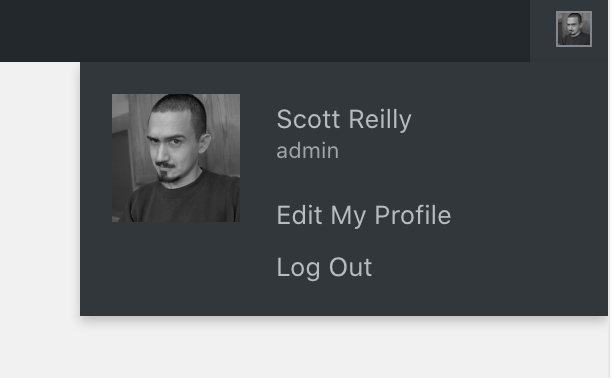
An image of the user section of the admin bar when “Howdy” and the username is hidden, leaving only the avatar.

An image of the user section of the admin bar when “Howdy” and the avatar is hidden, leaving only the username.

A screenshot of the plugin’s admin settings page.

A screenshot of a fully trimmed admin interface.
-
Installation
- Install via the built-in WordPress plugin installer. Or download and unzip
admin-trim-interface.zipinside the plugins directory for your site (typicallywp-content/plugins/) - Activate the plugin through the ‘Plugins’ admin menu in WordPress
- Click the plugin’s ‘Settings’ link next to its ‘Deactivate’ link (still on the Plugins page), or click on the ‘Appearance’ -> ‘Admin Trim Interface’ link, to go to the plugin’s admin settings page. Customize the settings to selectively remove admin interface elements.
- Install via the built-in WordPress plugin installer. Or download and unzip
-
Release Log
3.5.1 (2021-04-14)
- Fix: Update plugin framework to 061 to fix a bug preventing settings from getting saved
3.5 (2021-04-05)
- This minor release updates the plugin framework and notes compatibility through WP 5.7+.
Details:
- Change: Update plugin framework to 060
- 060:
- Rename class from
c2c_{PluginName}_Plugin_051toc2c_Plugin_060 - Move string translation handling into inheriting class making the plugin framework code plugin-agnostic
- Add abstract function
get_c2c_string()as a getter for translated strings - Replace all existing string usage with calls to
get_c2c_string()
- Add abstract function
- Handle WordPress’s deprecation of the use of the term “whitelist”
- Change: Rename
whitelist_options()toallowed_options() - Change: Use
add_allowed_options()instead of deprecatedadd_option_whitelist()for WP 5.5+ - Change: Hook
allowed_optionsfilter instead of deprecatedwhitelist_optionsfor WP 5.5+
- Change: Rename
- New: Add initial unit tests (currently just covering
is_wp_version_cmp()andget_c2c_string()) - Add
is_wp_version_cmp()as a utility to compare current WP version against a given WP version - Refactor
contextual_help()to be easier to read, and correct function docblocks - Don’t translate urlencoded donation email body text
- Add inline comments for translators to clarify purpose of placeholders
- Change PHP package name (make it singular)
- Tweak inline function description
- Note compatibility through WP 5.7+
- Update copyright date (2021)
- 051:
- Allow setting integer input value to include commas
- Use
number_format_i18n()to format integer value within input field - Update link to coffee2code.com to be HTTPS
- Update
readme_url()to refer to plugin’s readme.txt on plugins.svn.wordpress.org - Remove defunct line of code
- Change: Move translation of all parent class strings into main plugin file
- Change: Note compatibility through WP 5.7+
- Change: Update copyright date (2021)
- Change: Tweak formatting for readme.txt changelog entry for v3.4
3.4 (2020-06-27)
- This recommended release adds the ability to hide the “My Sites” icon, prevents output of plugin-specific settings styles on other admin pages, omits the
typeattribute forstyletag for themes that support ‘html5’, updates the plugin framework, adds a TODO.md file, updates a few URLs to be HTTPS, expands unit testing, updates compatibility to be WP 4.9 through 5.4+, and more.
Details:
- New: Add ability to trim “My Sites” icon in admin bar
- New: Add HTML5 compliance by omitting
typeattribute when the theme supports ‘html5’ - Change: Prevent output of plugin-page specific CSS elsewhere
- Change: Discontinue handling for contextual help text added via deprecated filter
contextual_help - Change: Update plugin framework to 050
- Allow a hash entry to literally have ‘0’ as a value without being entirely omitted when saved
- Output donation markup using
printf()rather than using string concatenation - Update copyright date (2020)
- Note compatibility through WP 5.4+
- Drop compatibility with version of WP older than 4.9
- New: Add TODO.md and move existing TODO list from top of main plugin file into it
- Change: Refactor handling of dynamic CSS rules and ensure they output properly indented
- Change: Adjust some CSS formatting (add second colon for
::beforeand spaces around>) - Change: Adjust output spacing for CSS
- Change: Note compatibility through WP 5.4+
- Change: Drop compatibility for version of WP older than 4.9
- Change: Add missing text domain from a few string translation calls
- Change: Remove unnecessary numbering of sole placeholder in string
- Change: Update links to coffee2code.com to be HTTPS
- Change: Update legend image
- Change: Update screenshot images
- Unit tests:
- New: Add tests for
add_css(),admin_init(),explain_nonce(),show_admin_notices(),show_legend_image() - New: Add test for setting name
- New: Add helper
set_current_screen()for setting the current screen, defaulting to plugin’s setting page - Change: Store plugin instance in test object to simplify referencing it
- Change: Update tests for default hooks, removing a duplicate and adding 2 that were missing
- Change: Use HTTPS for link to WP SVN repository in bin script for configuring unit tests (and delete commented-out code)
- New: Add tests for
-
Copyright & Disclaimer
Copyright © 2009-2024 by Scott Reilly (aka coffee2code)This program is free software; you can redistribute it and/or
modify it under the terms of the GNU General Public License
as published by the Free Software Foundation; either version 2
of the License, or (at your option) any later version.This program is distributed in the hope that it will be useful,
but WITHOUT ANY WARRANTY; without even the implied warranty of
MERCHANTABILITY or FITNESS FOR A PARTICULAR PURPOSE. See the
GNU General Public License for more details.You should have received a copy of the GNU General Public License
along with this program; if not, write to the Free Software
Foundation, Inc., 51 Franklin Street, Fifth Floor, Boston, MA 02110-1301, USA. -
Discussion / Support
Have any questions, comments, or suggestions? Please provide them via the plugin’s WordPress.org support forum. I’ll do my best to reply in a timely fashion and help as best I can.
Unfortunately, I cannot provide guaranteed support, nor do I provide support via any other means.
Was this plugin useful useful to you? Consider giving it a rating. If you’re inclined to give it a poor rating, please first post to the support forum to give me a chance to address or explain the situation.
Categories
4 replies on “Admin Trim Interface”
[…] Admin Trim Interface […]
[…] schaut es Euch am besten selber mal an und wenn Ihr wollt, könnt Ihr ja Eure Meinung mal dazu bekannt […]
[…] hide the footer links in the admin area; so if you wish to hide them then you should also use the Admin trim interface along with it. The disadvantage of "Admin trim interface" is that it does not offer you a […]
[…] need it to do. To a user such as the volunteers that work for Rescue 118, a plugin known as “Admin Trim Interface” can be used to customize the WordPress admin pages by selectively removing interface […]